Text message reminders
Lincoln County Sheriff’s Office Reserve — operated by 153 Fish LLC. Last updated 20 October 2026.
What these messages are
Reserve Tracker is the scheduling application used by volunteer deputies of the Lincoln County Sheriff’s Reserve to sign up for shifts and record their hours. It is a volunteer-run, self-funded project. It was built by Matthew Erickson, a volunteer deputy in the reserve, for his fellow deputies. His company, 153 Fish LLC, hosts it, pays its costs, and sends these text reminders from toll-free number (844) 791-5518. No one is paid, and neither the reserve nor any deputy is charged.
Deputies who choose to receive them get short reminders about shifts they have already signed up for — one the afternoon before (about 4 PM), and one about an hour before each shift. A deputy with several shifts the next day gets one afternoon message listing them, not one per shift. If they also have a shift that evening, the same message lists it first, and that shift gets no separate reminder. That is the only thing these messages are used for. There is no marketing, and nothing is sent to anyone who has not asked for it.
Reserve Tracker: you have a shift tomorrow, Mon 9/21 - Fair - Day 3 at Lincoln County Fairgrounds, 5:30 PM. Reply STOP to opt out.
Reserve Tracker: you have 2 shifts tomorrow, Mon 9/21 - Fair - Day 3 at Lincoln County Fairgrounds, 9:00 AM; Fair - Day 3 at Lincoln County Fairgrounds, 5:30 PM. Reply STOP to opt out.
Reserve Tracker: TONIGHT - Fair - Day 2 at Lincoln County Fairgrounds, 5:30 PM. TOMORROW, Mon 9/21 - Fair - Day 3 at Lincoln County Fairgrounds, 5:30 PM. Reply STOP to opt out.
How deputies opt in
This is a closed roster of roughly twenty volunteer deputies. There is no public sign-up, no purchased list, and no way to be added by anyone else.
A deputy signs in to their account, opens their own profile page, and ticks a box agreeing to receive reminders. Consent is recorded against that deputy’s account with the date and time it was given. An administrator cannot tick the box on someone else’s behalf — the page only ever writes to the account of whoever is signed in.
What a deputy sees
The opt-in sits inside a deputy’s account, so it cannot be reached without signing in. This is the consent block exactly as it appears on their profile page, reproduced here for reference. It does nothing — consent can only be given from inside the account it belongs to.
Phone
The real form, exactly as a signed-in deputy sees it on their profile page. Ticking the box and pressing Save Changes records the consent. (Also at /opt-in-screenshot.png.)
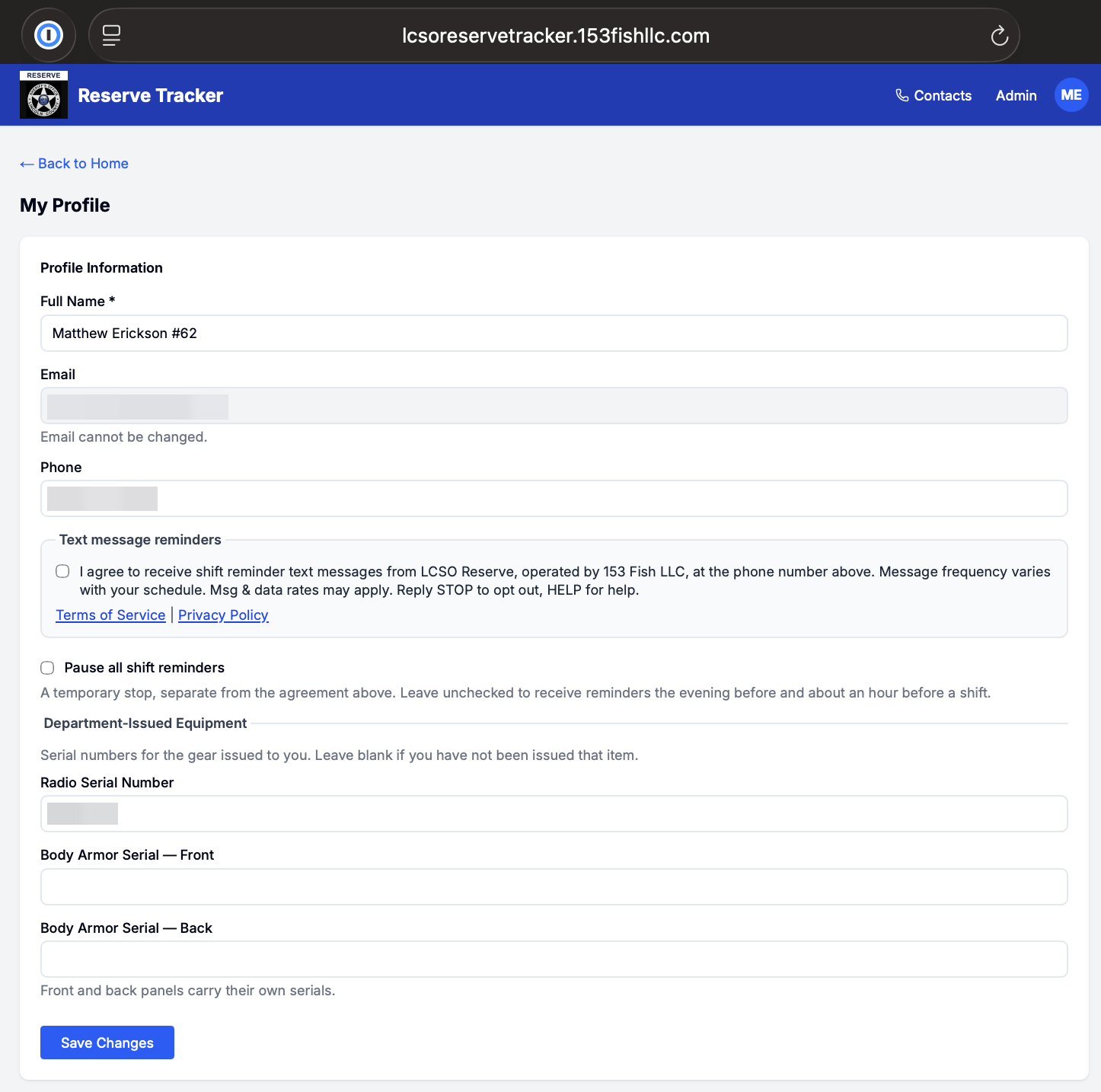
- The checkbox is never pre-selected; a deputy has to tick it.
- The phone number is the deputy’s own, already held on their account.
- Ticking it and saving records the consent against that account with the date and time.
How to stop
Reply STOP to any message. That takes effect immediately at the carrier and no further messages are sent. Reply HELP for assistance.
A deputy can also clear the same checkbox on their profile page at any time, which stops the messages without needing to reply to one.
On this number only STOP (or the other standard opt-out words) stops messages, and only START or UNSTOP lets them through again. A deputy who replied STOP and wants reminders back texts START, then turns reminders back on in their own profile. An administrator cannot turn them back on for anyone.
Frequency and cost
Message frequency depends on how often a deputy signs up for shifts — at most four messages a day: one the afternoon before, covering all of the next day’s shifts (and any that evening) in a single message, and one about an hour before each shift. Typically a handful a month. There is no fixed schedule and no daily or weekly send.
We do not charge for these messages. Message and data rates may apply from the deputy’s own mobile carrier.
Contact
Questions about these messages, or about what is held on your account: matt@153fishllc.com.